A free 2027 NFL mock draft simulator
Mock Draft Deck is a free NFL mock draft simulator built around one decision: who would you take when your team is on the clock? Choose a team, enter the draft room and pick from a board of 300 prospects in the 2027 class. The other teams make their selections automatically, so you can concentrate on the players still available when your turn arrives.
The default is the first round: 32 selections, with pick ownership taken from a dated source projection. You can choose two or three rounds, trade remaining picks, or use commissioner mode to make every selection yourself. There is no sign-up screen, app download or paid tier. Open the room, choose how much of the draft you want to control and start building your class.
How to use the NFL mock draft simulator
- Open the draft room. Press Start your mock draft above. The simulator loads in the same place; Fullscreen gives you more space on a small display.
- Choose rounds and a team. Use Edit to set rounds and CPU strategy. Select a team to review its picks; teams marked No picks cannot start in those rounds. Choose Control all teams for commissioner mode.
- Choose the CPU strategy. Board + team needs adds a bounded preference for the source's dated position priorities. Best available follows the source ranking alone.
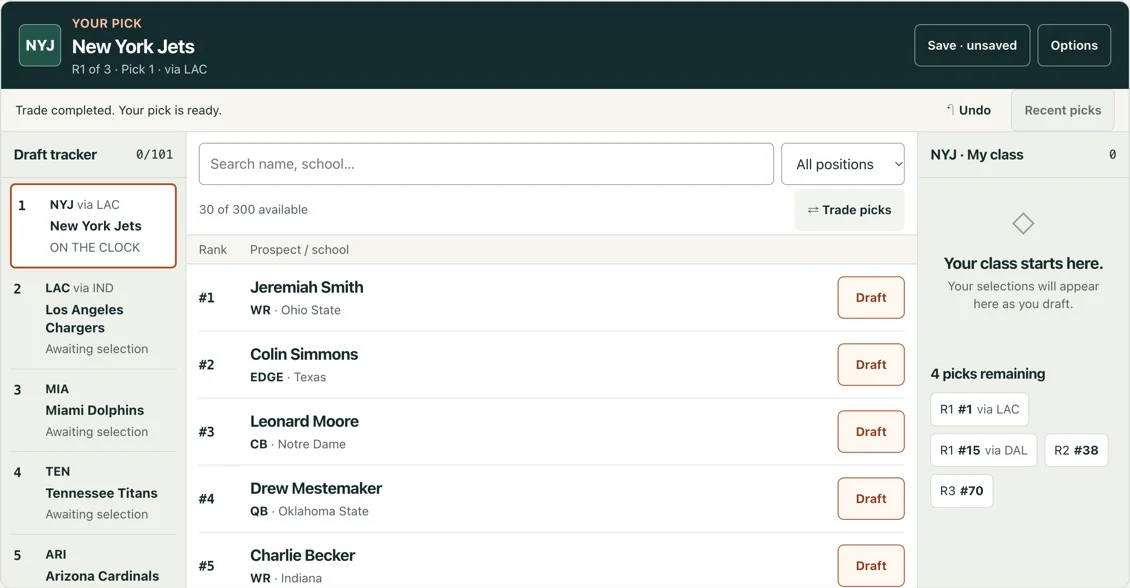
- Review the players. Search by name or college, or use the position filter. Each player has a board rank, listed position and school. The rank describes their place on the source board, not an official NFL evaluation.
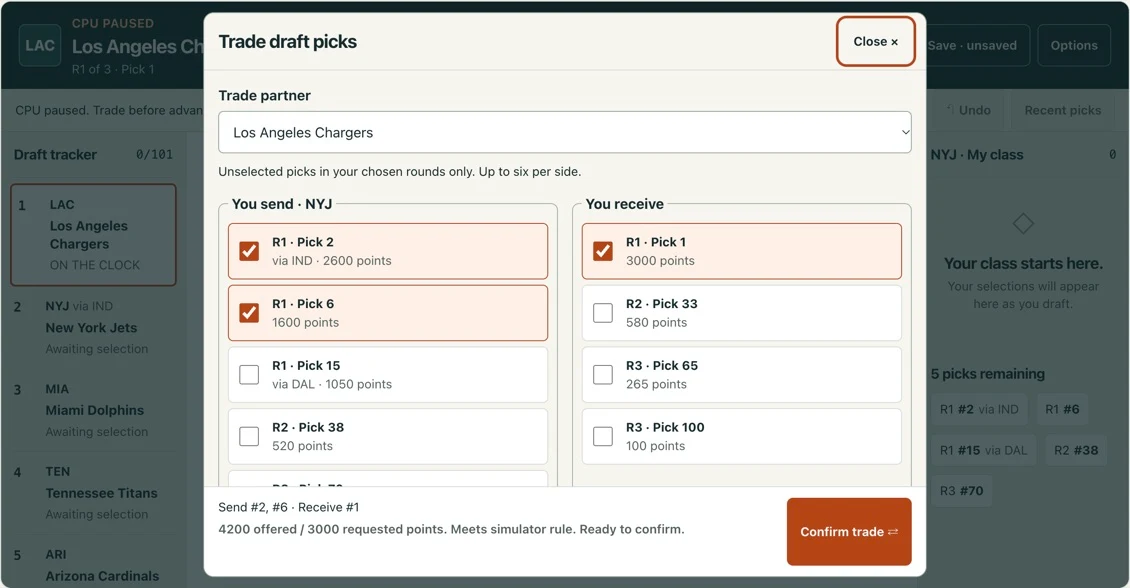
- Make or trade a pick. Press Draft next to a player. Use Trade picks to exchange unselected choices with another team. To move up before CPU selections, choose Trade first from the team setup screen.
- Review or revise. Undo action returns to your previous manual decision, whether it was a selection or a trade, and removes the CPU selections that followed it.
- Keep the result. Share draft creates a public, read-only link with your finished board and trades. You can also export a text file or copy completed results. Save draft stores the current session through the site's player service so the same browser can load it later.
Mouse and touch controls work the same way: select a team, then a prospect or trade package. Keyboard users can move between controls with Tab and activate a button with Enter or Space. Use the search field for a name fragment or college, and clear the position filter to return to the complete available pool.
How the simulator makes CPU picks
You draft one team; the CPU runs the other 31. In the default Board + team needs mode, each CPU pick weighs the ranked board against that team's dated position priorities. The clock returns to you at your team's next selection.
The default Board + team needs strategy compares nearby available players. It uses Drafttek's public position priorities, applies a modest boost to high-priority positions and reduces that boost after the team has drafted the same position group. A need cannot pull a player from more than 15 ranking places below the best remaining prospect. The simulation method explains the formula and source limitations.
Best available is the simpler alternative: CPU teams always take the highest-ranked remaining player. Both strategies are deterministic. If you use the same data and settings and make the same decisions, the remaining selections are the same. Neither option uses private scouting, live injuries, contract projections or inside information about a team's intentions.
There are no performance grades or projected win totals. Your result is the class you selected, plus the complete draft tracker. A lower-ranked prospect is not automatically a bad choice, and a high rank does not guarantee professional success. Use the tool to compare possibilities and explain your decisions to other fans.
Trading picks without losing track of the board
In single-team mode, each side of a trade can contain up to six unselected picks from the rounds in your session. The trade window shows the public chart points of the package you offer and the package you request. The CPU accepts an offer worth at least 95% of its outgoing chart value. That threshold is our game rule; it is not a claim about real negotiation behavior.
Compare packages first with the 2027 NFL draft trade value chart and calculator, which uses the same points and 95% acceptance rule as the draft room.
A completed trade updates the current owner in the tracker. It does not change the original owner of a slot, reuse a selected player or turn a completed selection back into an available pick. Future-year picks and player-for-pick trades are outside this version. After a trade, CPU play pauses so you can inspect the board before continuing to your next pick.
To move up, trade before the target slot has been selected. A pick already made is unavailable. To move down, exchange your current selection for later choices and then continue the draft. Undo action can reverse the trade and subsequent CPU selections. Your exported text includes a transaction log, and a saved session retains both pick ownership and trade history.
Understand the 2027 NFL draft order and prospects
This snapshot contains 300 prospects and 101 picks across three rounds. Its five projected compensatory slots are not final NFL awards; the sidebar lists the source dates.
The current holder makes each selection; “via” identifies the original team. Some teams hold several first-round choices, while others need a longer session to reach their first pick.
Transactions, eligibility and player decisions can change the final draft. Research the same snapshot through the first-round order or complete prospect board, then try your selections in the room.
Questions about playing your mock draft
Do I need an account to play?
No. Mock Draft Deck is free to play in your browser, with no account, app or download required. Pick a team and choose one, two or three rounds to begin.
How many rounds can I simulate?
Choose one, two or three rounds. One round contains 32 picks; three rounds contain 101 projected selections, including five projected compensatory picks. The board includes 300 prospects.
Why is my team dimmed in the selector?
It has no selection in your chosen rounds in this dated snapshot. Choose more rounds if it has later picks, or use commissioner mode to control every selection.
Can I draft for just one team and let the CPU pick for the rest?
Yes. Choose one team and the CPU runs the other 31. The default Board + team needs strategy weighs source rankings against dated position priorities, with a smaller boost after a position is filled. Choose Best available to follow rankings alone; neither option predicts real team decisions.
Can I trade picks during the draft?
Yes. In single-team mode, choose Trade first to move up before CPU selections, or Trade picks during play. Only unselected picks in your chosen rounds are eligible. The CPU accepts at least 95% of the outgoing public chart value; this threshold is a game rule.
Can I undo a selection?
Yes. Undo action reverses your last manual selection or trade and the CPU picks that followed it. You can then try a different decision.
Can I save or share my finished mock draft?
Yes. Save draft keeps a session for this browser. After finishing, Share draft creates a public, read-only link showing your team, every pick and simulated trade. Anyone with the link can view it without an account. You can also copy results or export a text file.
Does it work on my phone's browser?
Yes. Play directly in your phone's browser without installing an app or downloading the game. Touch controls and separate prospect, draft-board and class views fit narrow screens. On small screens the game opens a focused view; Back to site keeps the same draft in place.
Is the data live or official?
No. This is a dated Drafttek snapshot. Draft order, needs and eligibility can change. Source dates appear in the scouting report; this project is independent of the NFL and its teams.
Why only 1–3 rounds?
This version uses a verified projected order for the first three rounds and a 300-player prospect board. It does not include a complete seven-round order. Choose one round for a short draft or extend your session to two or three rounds; later selections are not invented.
Is there a draft grade?
No. Your result includes the players selected, the complete draft tracker and any simulated trades. Board rank and chart value help you compare choices, but this version does not assign a letter grade, a score or a projected win total.
Talk draft.
Who did you take, and who did you pass on? Share your draft strategy.
Start the conversation with your draft picks.